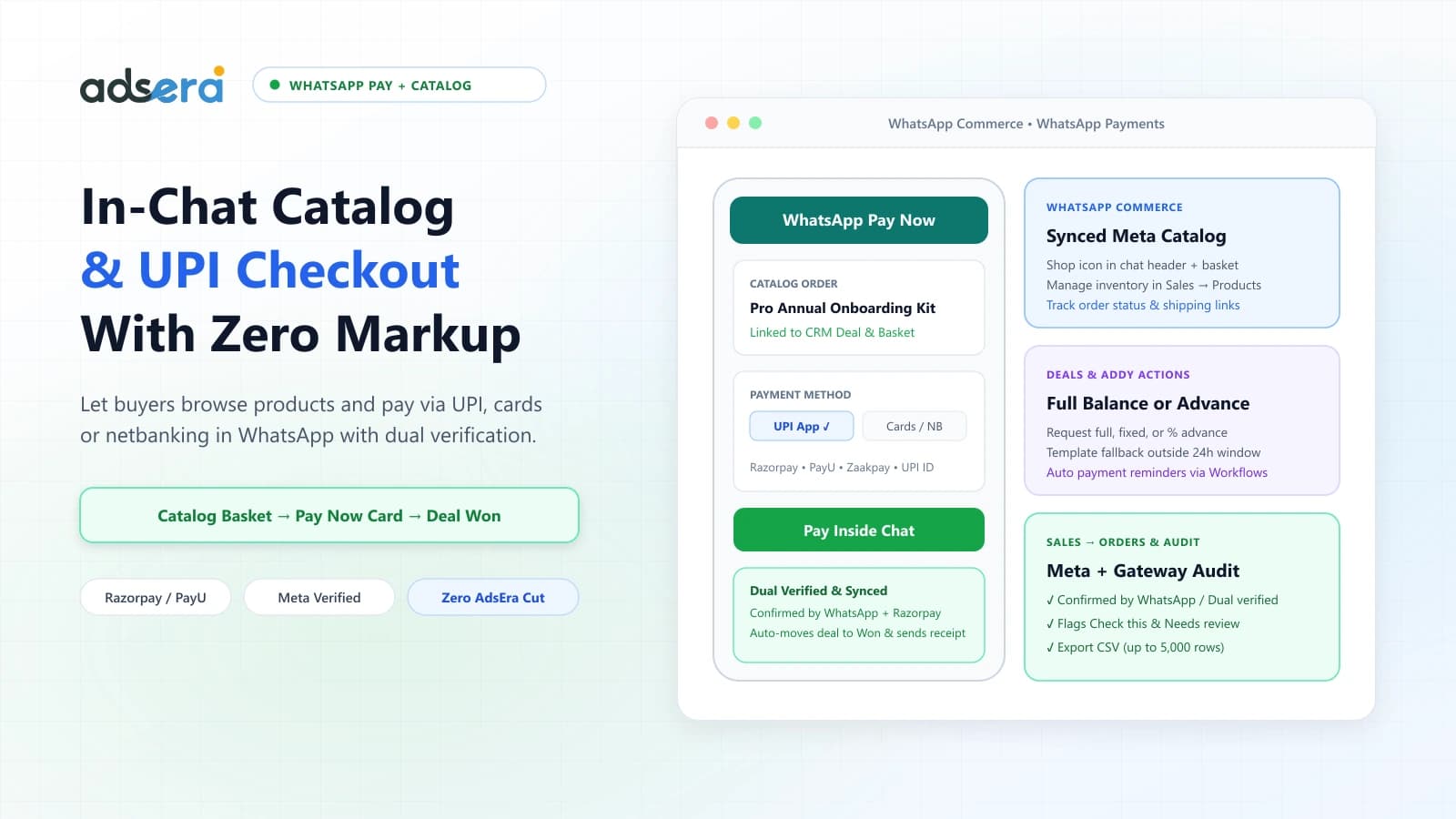
Sending a customer off WhatsApp to an external checkout page introduces extra logins, OTP friction, and abandoned carts. For Indian D2C brands, coaching institutes, and service businesses, WhatsApp Commerce + WhatsApp Pay lets customers browse your catalog, confirm their selection, and pay via UPI, cards, netbanking, or wallets without ever leaving the chat.
Even better, AdsEra cross-checks every transaction against Meta's official payment record and your gateway webhook, matches it automatically to the customer's CRM deal or order, and charges zero extra markup on WhatsApp or payment fees.
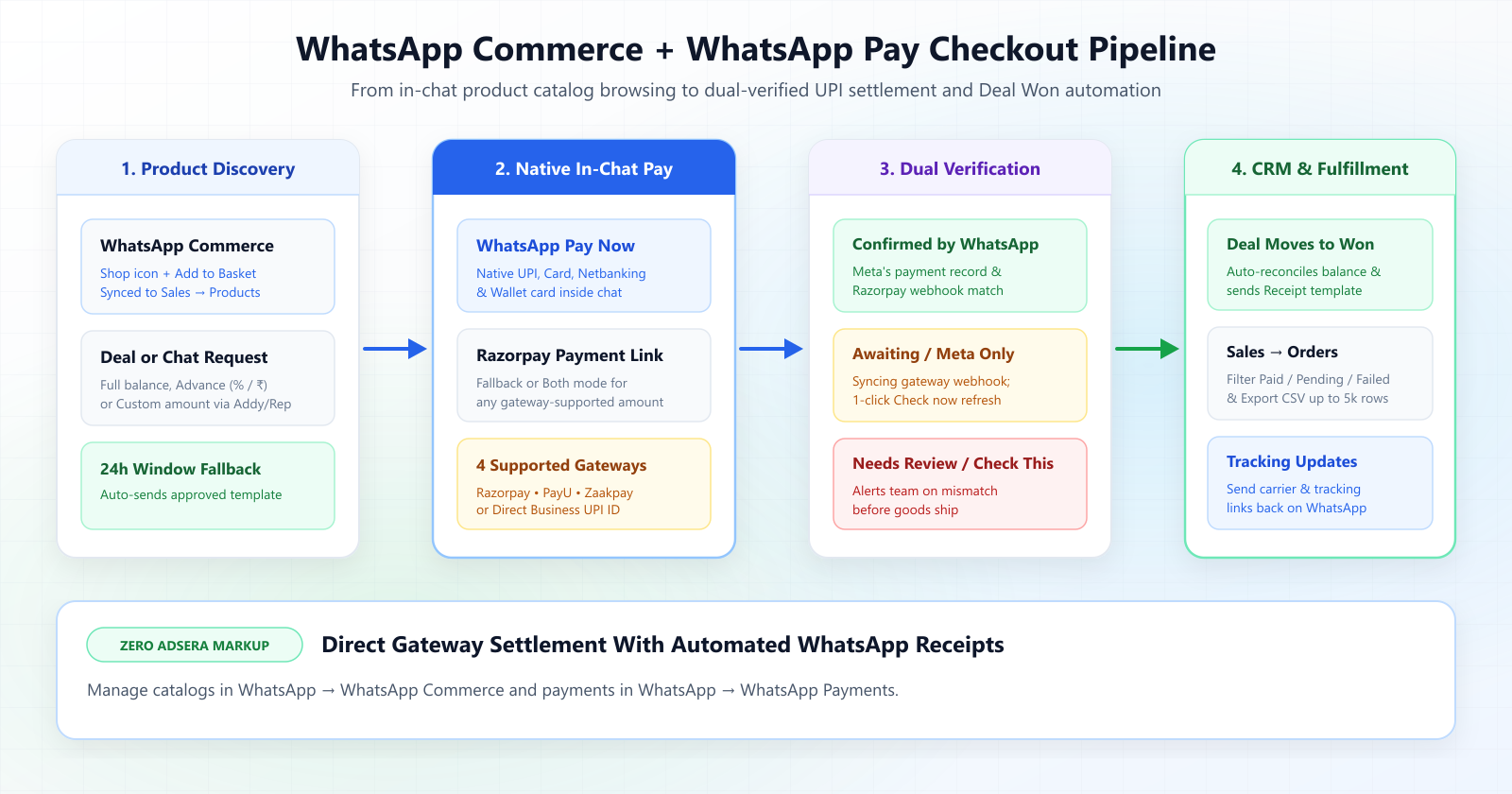
Step 1: Link Your Product Catalog (WhatsApp Commerce)
- Open WhatsApp → WhatsApp Commerce (app.adsera.in/dashboard/meta/commerce) and click Connect catalog (or Connect with Meta).
- Log in with Facebook, choose your non-ads-only Commerce catalog, and link it to your WhatsApp Business Account (one catalog per WhatsApp number). Catalogs marked Ads Only (such as property or travel listings) work in Meta Ads only and cannot attach to a WhatsApp storefront.
- Manage inventory under Sales → Products or inside the catalog view, check Diagnostics and Refresh Review for Meta approval, and verify under Settings that the Catalog Icon in Chat Header and Add to Basket Button are turned on.
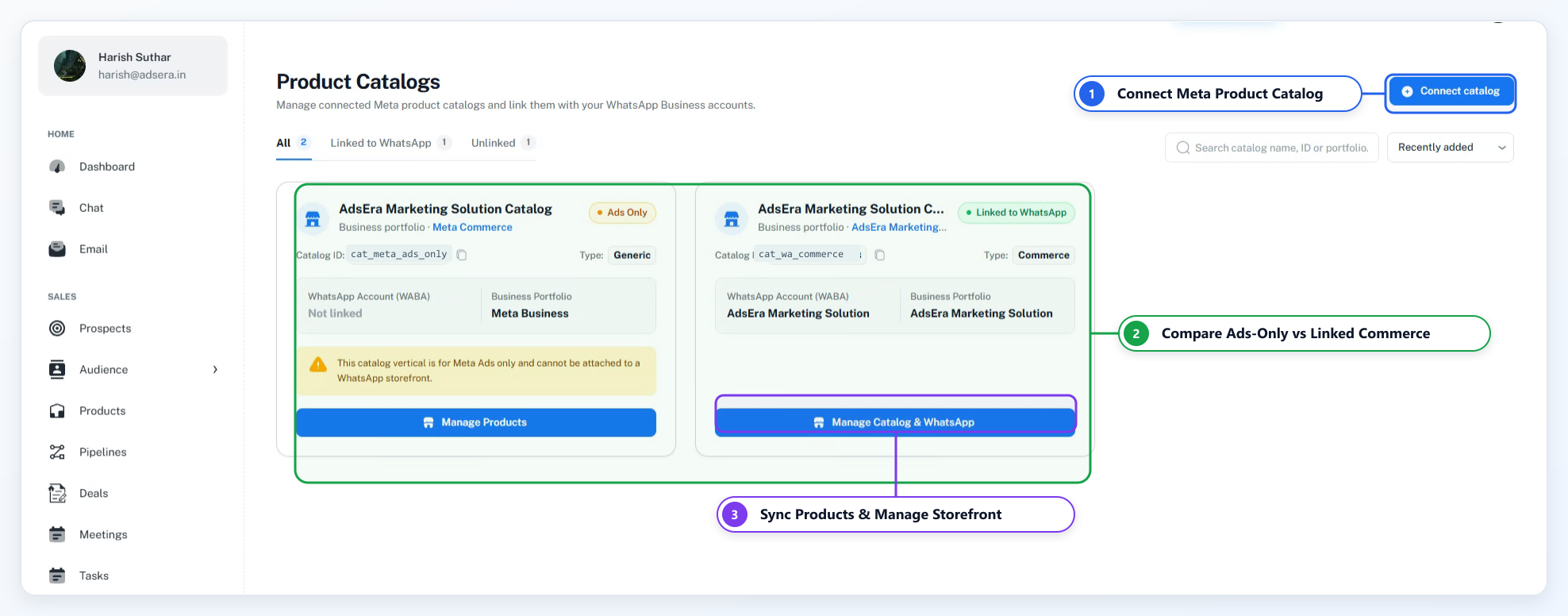
Once linked, reps in Team Inbox—or Addy via product cards and interactive quick replies—can share products live, receive basket orders under WhatsApp → WhatsApp Commerce → Orders, and update tracking details right back on WhatsApp.
Step 2: Set Up WhatsApp Pay With Razorpay, PayU, Zaakpay or UPI
WhatsApp Pay is supported for Indian businesses and numbers. Open WhatsApp → WhatsApp Payments (also under Automation → Connected tools → WhatsApp Pay at app.adsera.in/dashboard/meta/payments):
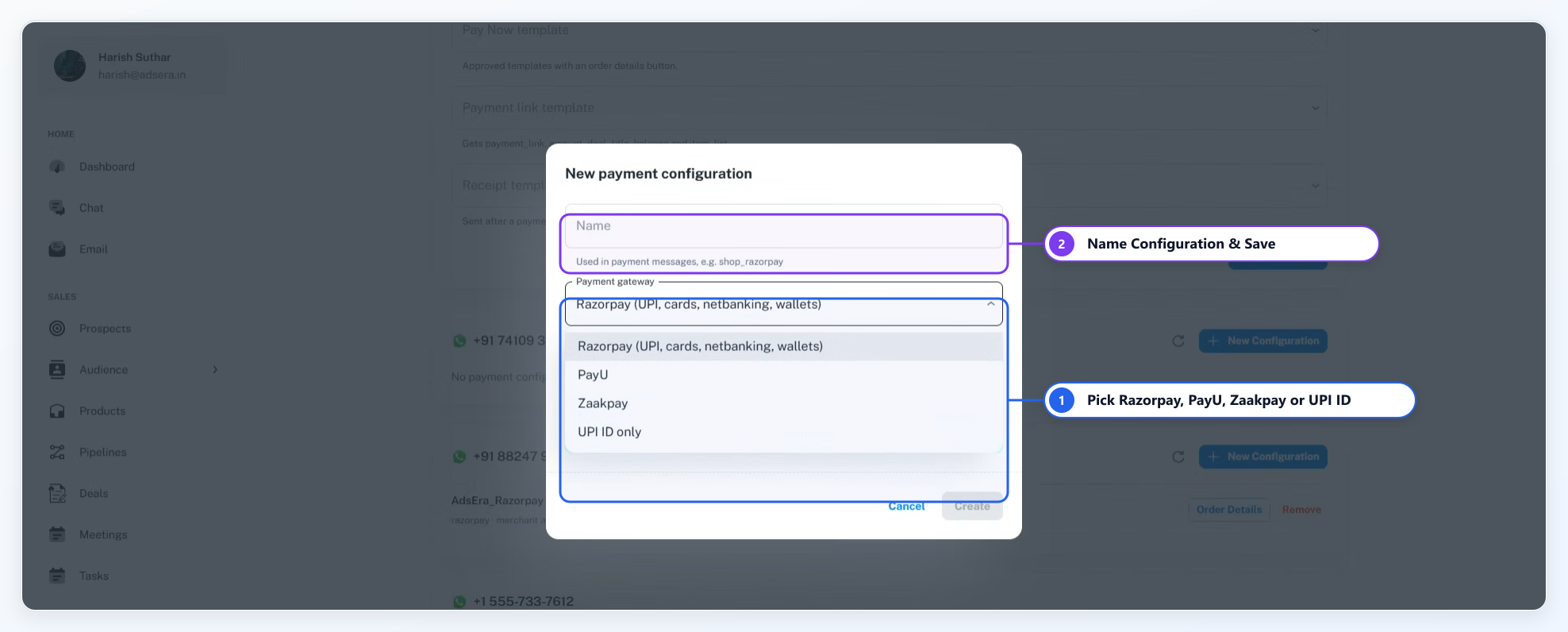
- Create Configuration: On your WhatsApp number card, click + New Configuration, enter a short lowercase name (e.g.,
shop_razorpay), pick your payment gateway—Razorpay (UPI, cards, netbanking, wallets), PayU, Zaakpay, or UPI ID only—plus your business category, and accept Meta's WhatsApp payments terms if prompted. - Connect Gateway & Order Details: Click Connect gateway account (or share a temporary connect link with your finance owner) until Meta marks the configuration Active, then click Order details to save your country of origin and importer business address (required by Meta before sending Pay Now cards).
- Configure Payment Settings: Choose WhatsApp Pay Now, Payment link (requires Razorpay connected under Connected tools), or Both—and assign approved Pay Now template, Payment link template, and Receipt template options for closed 24-hour chat windows.
Step 3: Collect From Deals & Verify Payments Before Shipping
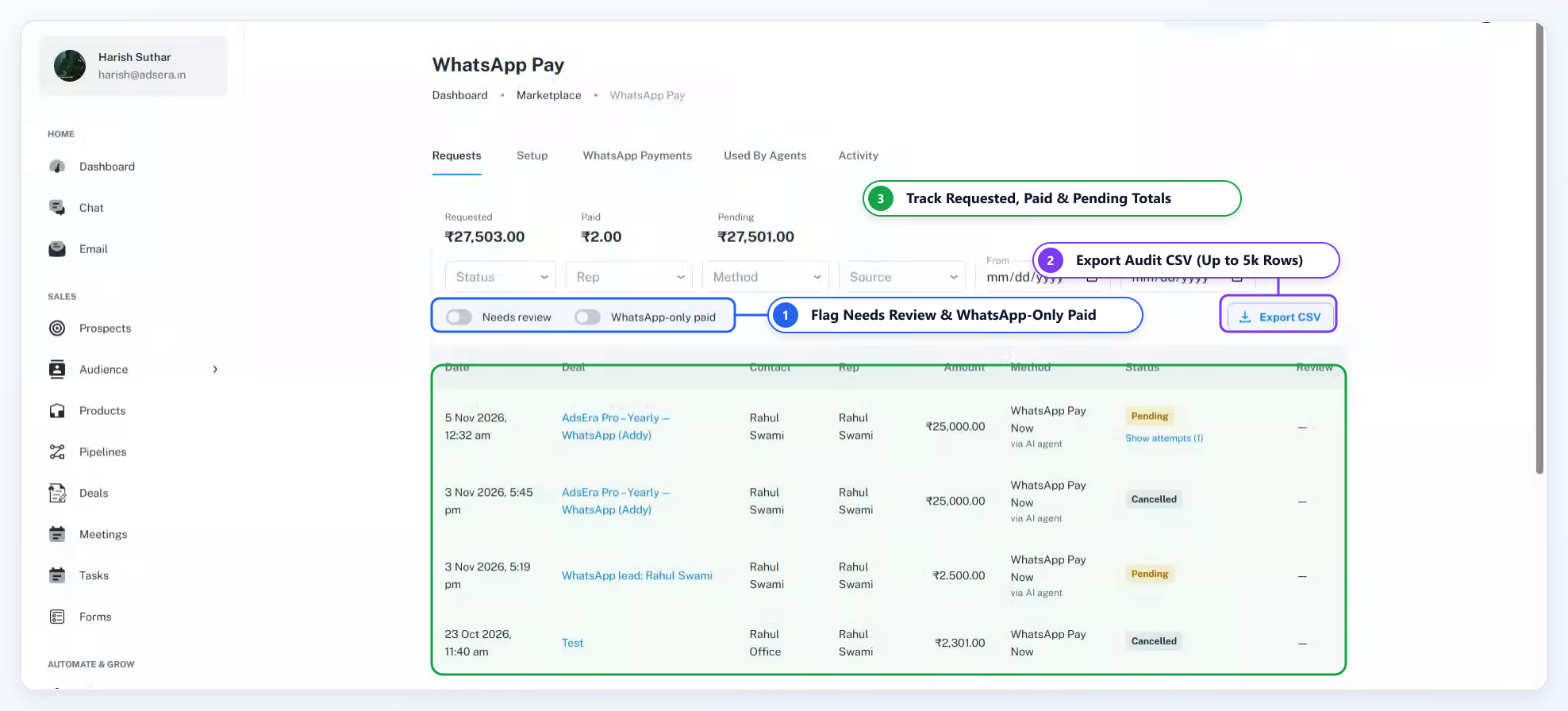
Open any deal under Sales → Deals (or press L from Prospects, or click Collect payment in a chat) to request the Full balance, a fixed/percentage Advance, or a Custom amount—and automatically move the deal to Won once paid in full. You can also allow Addy and Ask AI to send requests under Used By Agents.
| Verification Badge | What It Means for Your Fulfillment Team |
|---|---|
| Dual verified / Confirmed by WhatsApp | Paid and confirmed by Meta's official record (and matched by Razorpay when its webhook is enabled)—safe to deliver. |
| Awaiting Razorpay / Meta only | Meta confirmed the payment while gateway webhook confirmation is still syncing; click Check again / Check now to refresh. |
| WhatsApp-only paid / Check this | Amount or gateway confirmation differs between WhatsApp and Razorpay—flagged under Needs review so your team checks your gateway dashboard before dispatching. |
| Waiting / Pending | Payment request delivered; awaiting customer completion. Combine with Automation → Workflow templates → Payment reminder to nudge unpaid orders automatically. |
Pro Tip: Enable the payment webhook under Automation → Connected tools → Razorpay so AdsEra cross-checks every Pay Now card automatically and logs failed payment attempts in Sales → Orders (exportable up to 5,000 rows via Export CSV). Check AdsEra Pricing for current plan details—gateways settle funds straight to your account with zero AdsEra commission.
Explore the full documentation in the WhatsApp Pay guide, WhatsApp Commerce docs, Deal Payments guide, and Orders reference.
Turn WhatsApp Chats Into Completed UPI Orders
Book a 15-minute walkthrough to see in-chat catalog browsing, Razorpay-linked WhatsApp Pay, and Addy automated checkout live.