IndiaMART Leads to Instant WhatsApp Qualification (60s)

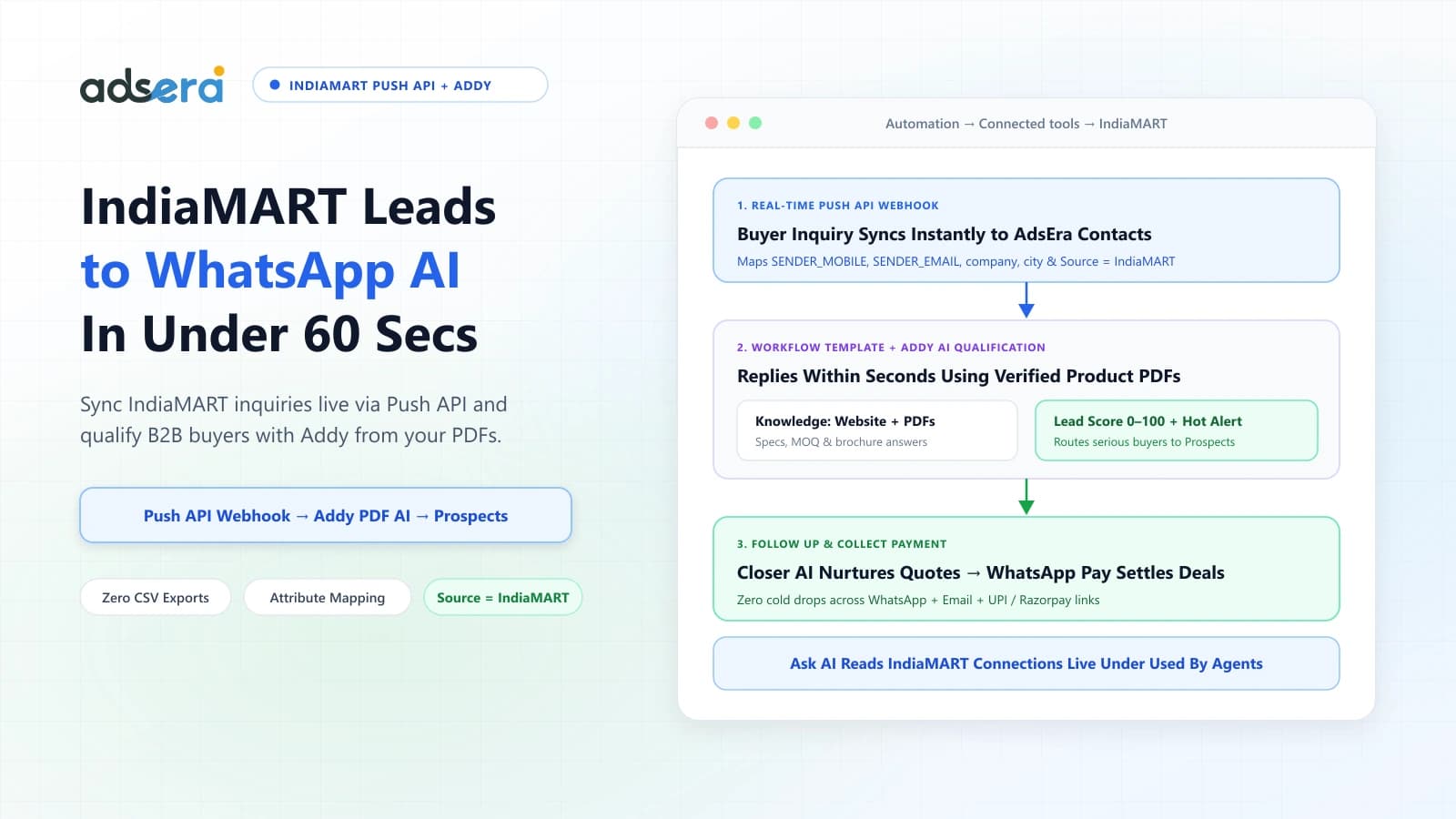
Connect IndiaMART Push API to AdsEra so every B2B buyer inquiry lands in your CRM and gets an instant WhatsApp response from Addy AI in seconds.

AdsEra
Harish Suthar
November 28, 2026
4 min read
IndiaMART Leads to Instant WhatsApp Qualification (60s)
Key Takeaways & Executive Summary

On IndiaMART, the first supplier to reply usually wins the B2B quote. Connecting AdsEra's IndiaMART Push API integration syncs every buyer inquiry into your CRM in real time and triggers an instant WhatsApp template plus 24/7 Addy AI product qualification.

  • Real-time Push API ingestion: Connect Automation → Connected tools → IndiaMART so new buyer inquiries land in AdsEra instantly without manual seller-panel refreshes or CSV exports.

  • Clean field & static mapping: Map SENDER_EMAIL, SENDER_MOBILE, buyer company, city, and product inquiry to CRM attributes—plus Static attribute mapping such as Source = IndiaMART.

  • Instant WhatsApp + Addy qualification: Trigger an immediate WhatsApp template via Workflows, let Addy answer from uploaded PDF brochures/website docs, and score buyer intent (0–100).

  • Quote-to-payment workflow: Route hot B2B buyers straight to Prospects, automate multi-channel follow-ups via Closer AI, and collect advances or full payments in-chat with WhatsApp Pay (see current plans).

On IndiaMART, the first supplier to reply usually wins the quote. Yet most B2B manufacturers, distributors, and wholesalers still check their seller dashboard hours later, export CSVs, or manually copy phone numbers onto a rep's WhatsApp—by which time the buyer has already finalized with someone faster.

With AdsEra's IndiaMART Push API integration, every new IndiaMART inquiry creates or updates a CRM contact in real time and immediately launches a WhatsApp workflow or Addy AI conversation—qualifying quantity, delivery city, and specs before your competitor even logs in.
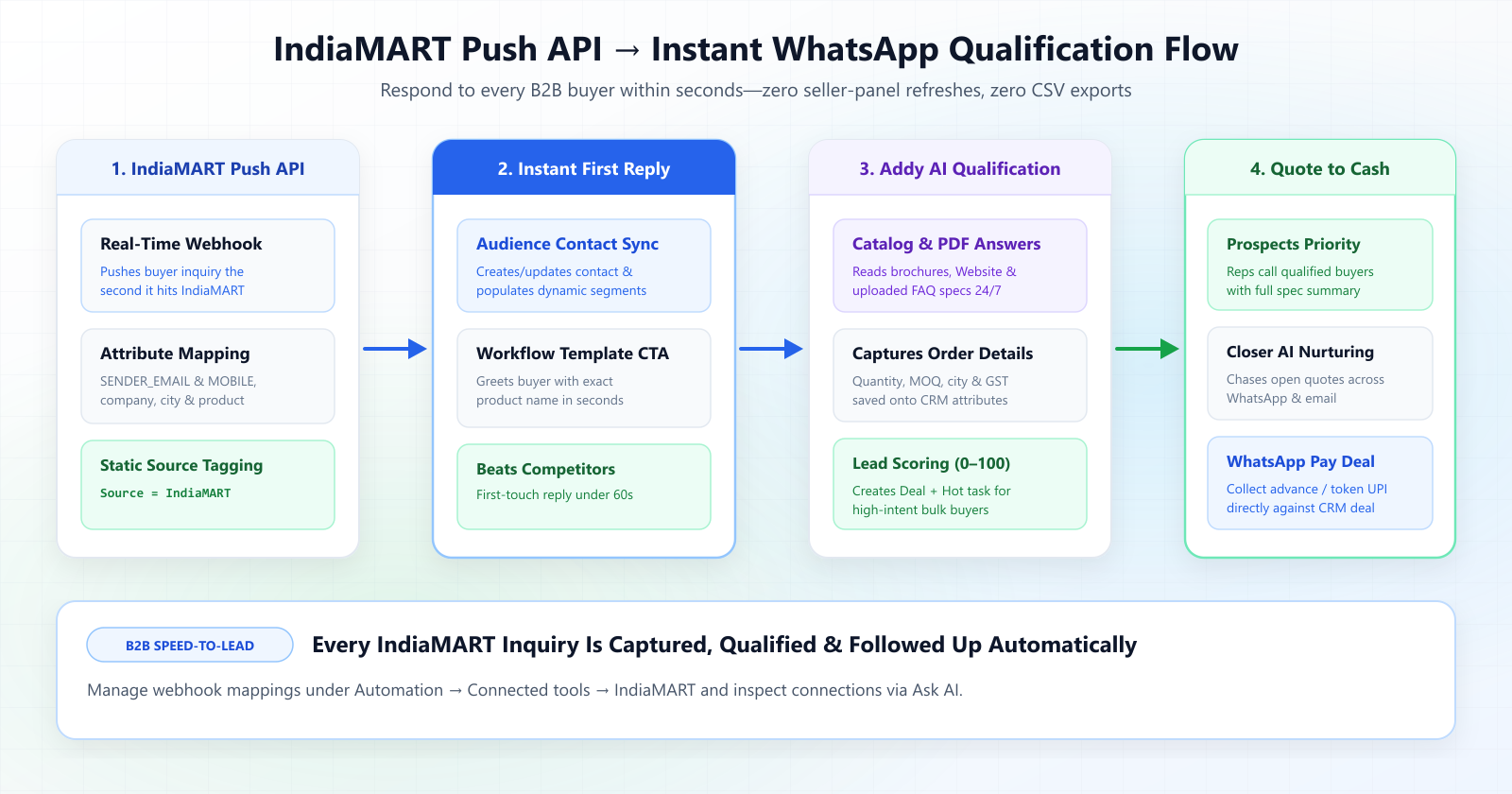
4-step IndiaMART Push API to AdsEra WhatsApp workflow from real-time buyer inquiry webhook and attribute mapping to Addy AI qualification and Prospects
Real-time IndiaMART Push API to AdsEra pipeline: webhook sync, attribute mapping, instant WhatsApp template, and Addy AI qualification.

How to Connect IndiaMART to AdsEra in 4 Steps

Before you start: Make sure you have an IndiaMART seller account with lead access and the Push API (lead forwarding) option enabled, plus the Integrations & data tables permission in AdsEra.
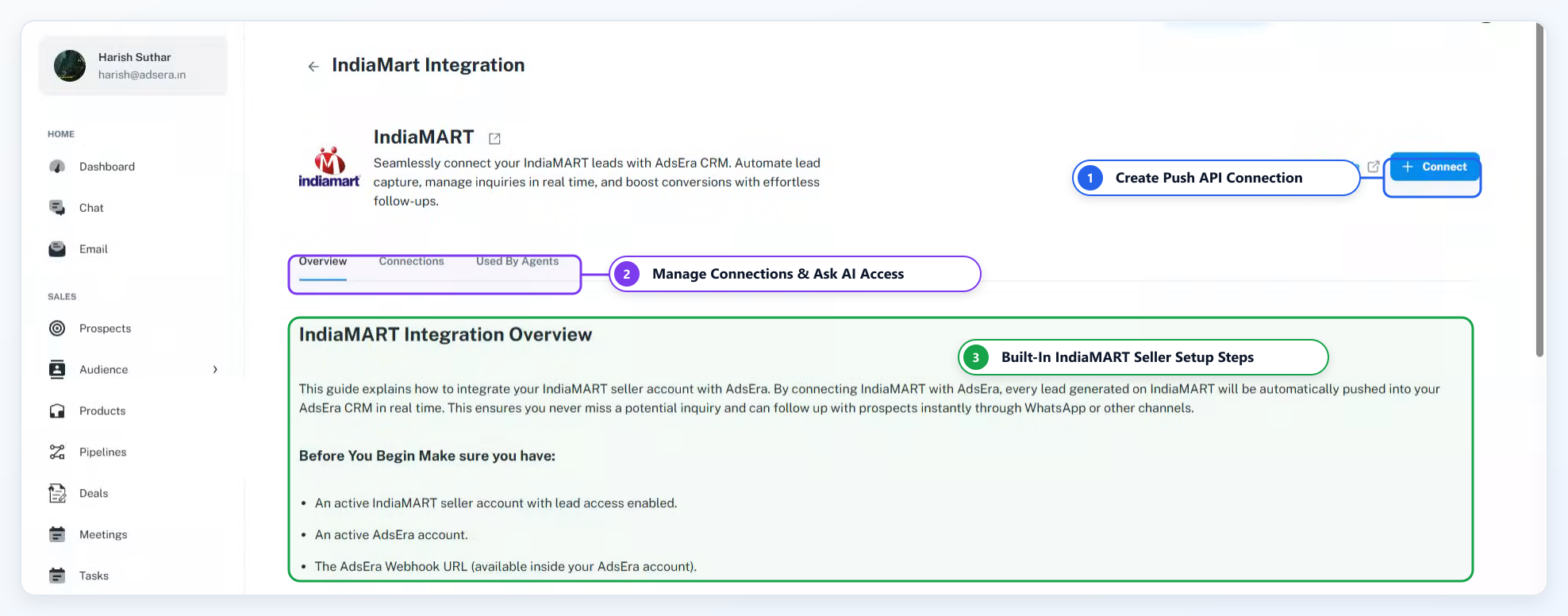
AdsEra IndiaMART connected tool setup screen highlighting Overview, Connections, Used By Agents Ask AI toggle, and Connect button
Open Automation → Connected tools → IndiaMART to manage connections, copy webhook URLs, and enable Used By Agents visibility.
  1. Create the Connection in AdsEra: Open Automation → Connected tools → IndiaMART (app.adsera.in/dashboard/marketplace/indiaMart) and click + Connect.

  2. Configure Field & Static Attribute Mapping: Give your connection a clear Name, map the buyer's EMAIL (SENDER_EMAIL) and MOBILE (SENDER_MOBILE) so AdsEra matches existing contacts cleanly, add extra inquiry fields (company, city, requested product, query message), and add Static attribute mapping (for example, Source = IndiaMART), then click Save.

  3. Copy Your Unique Webhook URL: Copy the webhook URL shown on your new connection card (such as https://app.adsera.in/intigration/indiaMart/webhook/<id>).

  4. Paste Into IndiaMART Seller Panel: In your IndiaMART Push API / Lead Forwarding settings, paste the AdsEra webhook URL as the push URL, enter AdsEra as the integration name, save, and submit a test lead to verify it appears under Audience → Contacts.
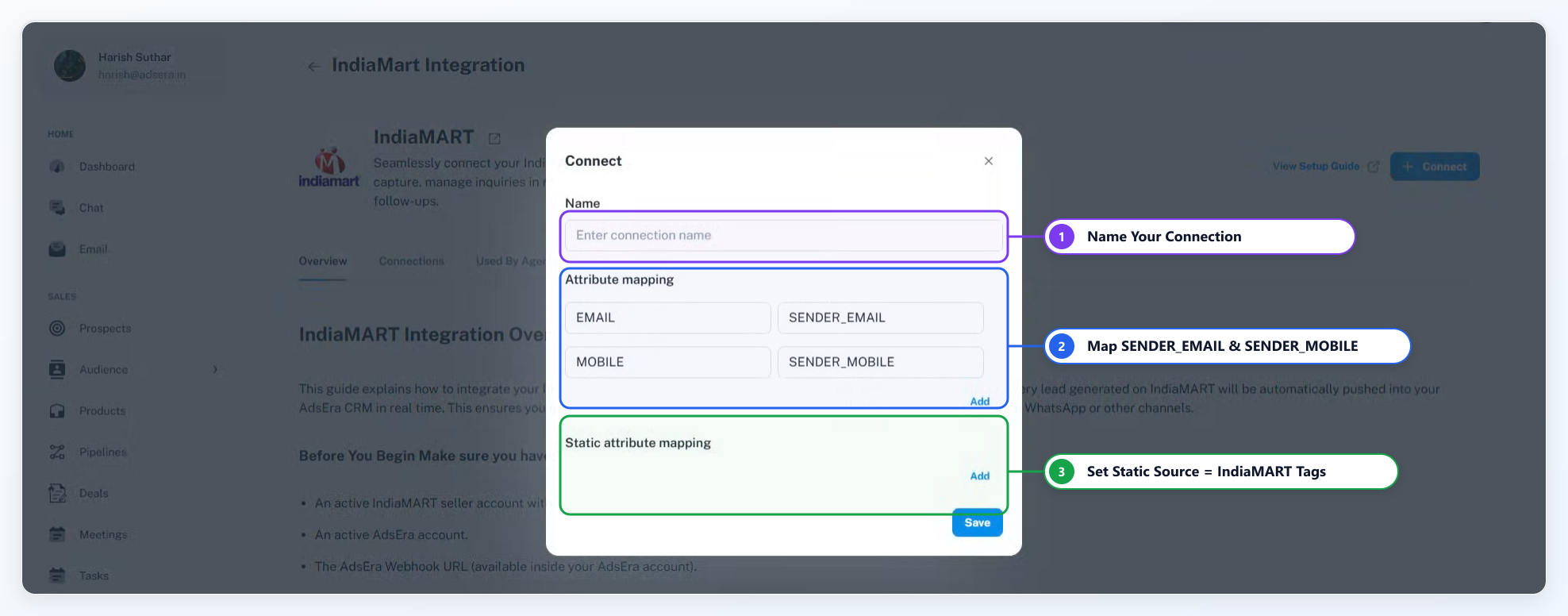
AdsEra IndiaMART connection modal showing SENDER_EMAIL and SENDER_MOBILE attribute mapping alongside Static attribute mapping such as Source IndiaMART
Map SENDER_EMAIL, SENDER_MOBILE, and inquiry fields to CRM attributes, plus Static attribute mapping for automatic lead attribution.

What Happens the Second a Buyer Submits an Inquiry

  • Real-Time Contact & Segment Sync: The buyer immediately lands under Audience with their requested product, city, company name, and source tag pre-populated—ready for dynamic segments and targeted broadcasts.

  • Instant First-Touch WhatsApp Message: Configure a Workflow to send an approved WhatsApp template seconds after webhook arrival—for example: "Hi {{name}}, thanks for your IndiaMART inquiry for {{product}}. Are you looking for bulk pricing or a sample unit?"

  • 24/7 Addy Qualification From Your Catalog & PDFs: Under Addy → Knowledge (Website, Files, Text, plus Questions to answer), Addy learns your brochures, technical specs, and website pages—so it answers buyer questions naturally, asks qualifying questions one by one, scores leads (0–100), and hands hot buyers straight to your team's Prospects queue.

  • Ask AI Visibility: Under the Used By Agents tab on the IndiaMART page, allow Ask AI to check your IndiaMART connections so reps can query incoming B2B inquiries in plain English.
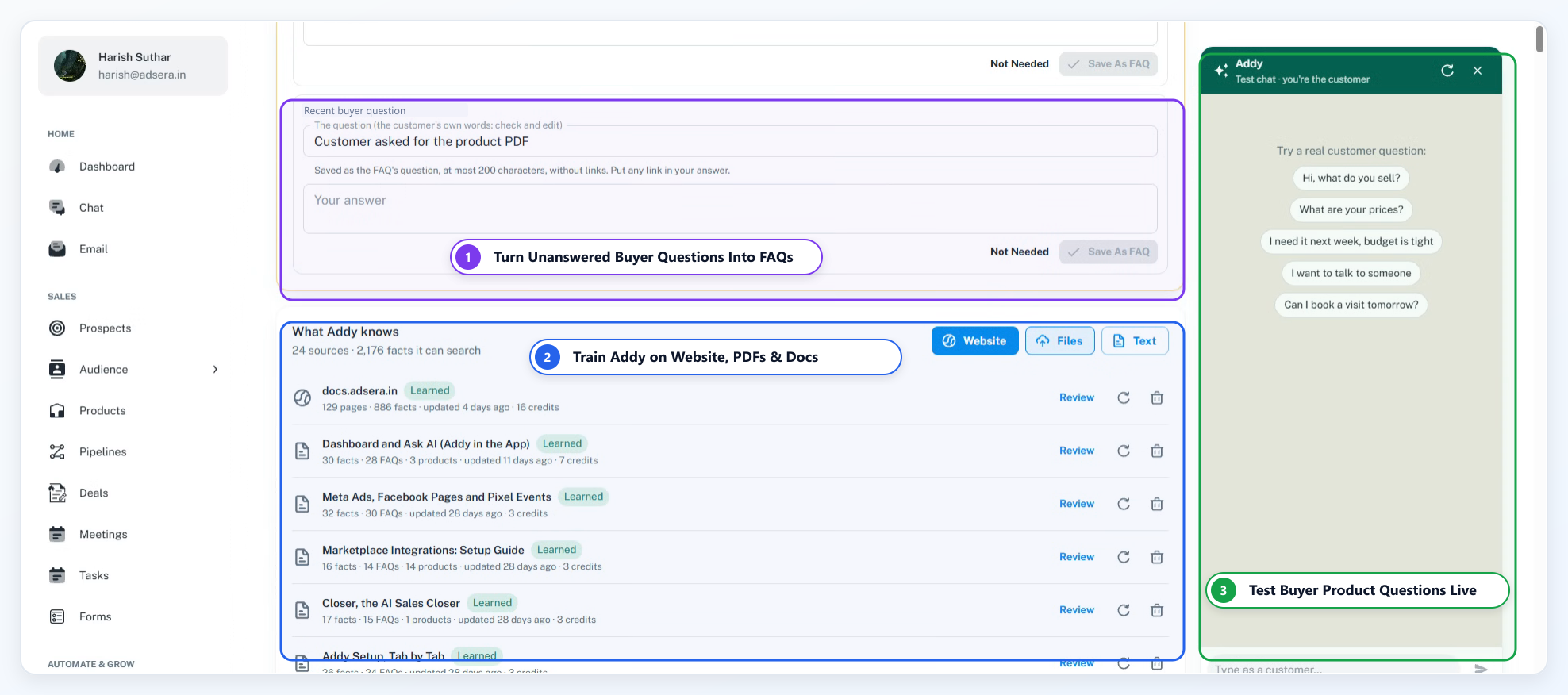
AdsEra Addy AI Knowledge base panel displaying Website URLs, uploaded PDF brochures and catalog Files, Text notes, and Questions to answer
Train Addy AI on your brochures, website pages, and FAQs under Addy → Knowledge so it qualifies B2B buyers over WhatsApp 24/7.

Why B2B Teams Switch From Manual IndiaMART Follow-Ups to AdsEra

Workflow Step

Manual Seller Panel

AdsEra + IndiaMART Push API

Lead Capture

Manual refresh or periodic CSV export

Real-time Push API webhook ingestion

First Response

Hours later during office hours

Seconds later via WhatsApp template + Addy AI

Follow-Up Discipline

Forgotten after 1 missed call

Closer AI follows up on WhatsApp & email until quote/win

Payment Collection

Manual bank screenshots

In-chat WhatsApp Pay / Razorpay link tied to the deal

Check the IndiaMART integration documentation for complete field-mapping details, and see AdsEra Pricing for plan limits.


Automate Your IndiaMART Lead Response Today

See how B2B teams turn raw IndiaMART inquiries into qualified WhatsApp conversations and closed deals in a 15-minute live demo.
Book a Live AdsEra Demo →  |  Create Your AdsEra Account

Filed under:B2B Automation

Was this article helpful?

Your feedback helps us continuously improve our marketing guides.

AdsEra
Author

Harish Suthar

Sharing data-driven strategies, omnichannel automation blueprints, and growth frameworks to help modern businesses scale customer engagement.

Recommended Reading

Related articles in B2B Automation

Continue learning with top-performing playbooks and strategies.

View all in category
WhatsApp Pay & Catalog: In-Chat UPI Checkout Guide
WhatsApp Commerce5m
Nov 28, 2026

WhatsApp Pay & Catalog: In-Chat UPI Checkout Guide

Sell from your WhatsApp product catalog and collect UPI, card, and netbanking payments inside chat with AdsEra WhatsApp Pay and Meta verification.

AdsEra
Harish Suthar
Read
WhatsApp Flows Booking: Cal.com, Calendly & Zoom in Chat
WhatsApp API5m
Nov 27, 2026

WhatsApp Flows Booking: Cal.com, Calendly & Zoom in Chat

Build native WhatsApp appointment booking forms with AdsEra Flows, synced live with Cal.com, Calendly, and Zoom so leads book without leaving chat.

AdsEra
Harish Suthar
Read
AI Voice Calling on WhatsApp: Addy Browser & AI Calls
AI & Automation5m
Nov 27, 2026

AI Voice Calling on WhatsApp: Addy Browser & AI Calls

Answer and place WhatsApp Business voice calls in your browser—or let Addy AI answer 24/7 with Indian voices, live transfers, transcripts, and call recaps.

AdsEra
Harish Suthar
Read
Join 10,000+ Marketers

Ready to Scale Your Revenue Engine?

Stop leaving money on the table. Automate your ad campaigns and watch your ROI skyrocket with AdsEra's AI-powered platform.

Start Free Trial
98%Customer Satisfaction
2.5xAverage ROI Increase
10k+Active Users
24/7Expert Support