High-intent buyers—especially patients calling clinics, parents inquiring about courses, or B2B buyers checking stock—often hit the call button inside WhatsApp instead of typing. Normally, those calls either ring on a single person's phone and get missed, or go completely untracked in your CRM.
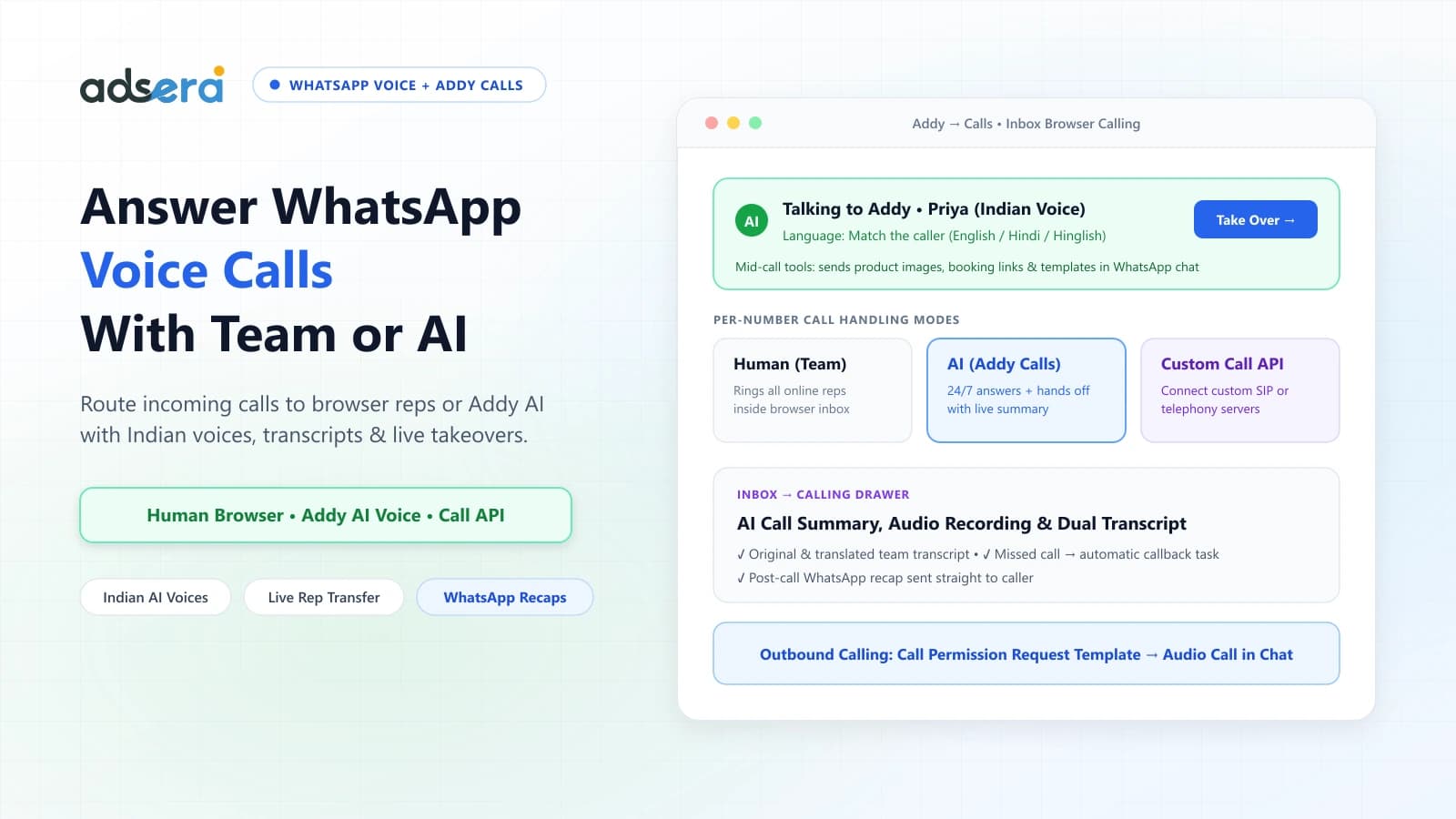
With AdsEra WhatsApp Calling, customers call your WhatsApp Business Cloud API number and your team answers straight in the browser—or Addy answers with a natural AI voice 24/7, sends photos and links mid-call, records transcripts, and transfers qualified callers to an online rep.
3 Call Handling Modes Per WhatsApp Number
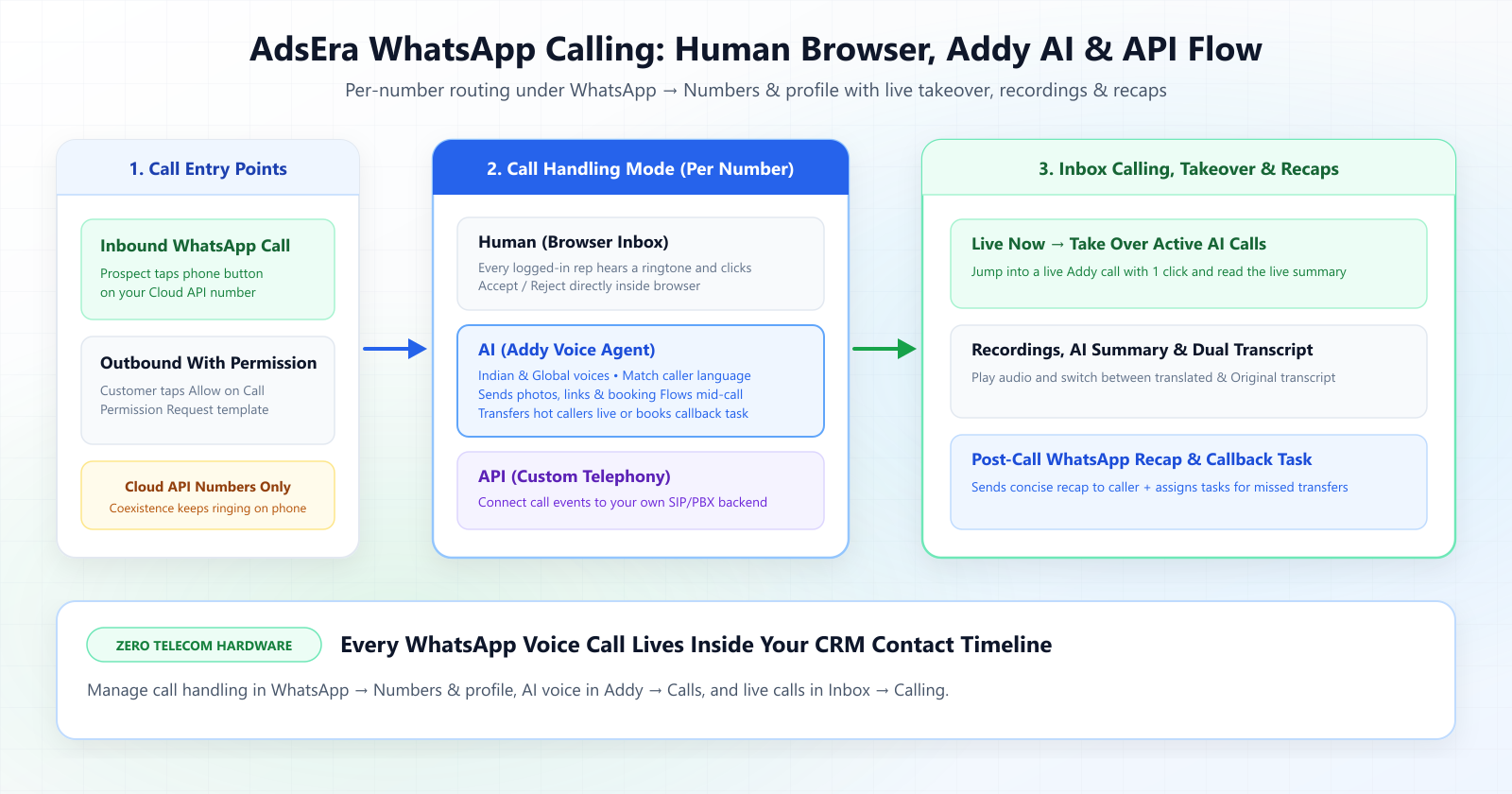
Open WhatsApp → Numbers & profile (app.adsera.in/dashboard/channel/whatsapp), select your Cloud API number, open Automation & settings, and choose who answers under Call handling:
| Mode | How It Works |
|---|---|
| Human (Team Inbox) | Every logged-in teammate sees the incoming call with caller name and number, hears a ringtone in AdsEra's browser inbox, and clicks Accept or Reject—no physical phone required. |
| AI (Addy Calls) | Addy answers using your verified business knowledge, tools, and catalog/booking capabilities (billed from unified AI credits; see AdsEra Pricing and AI credits docs). |
| API | Route live call events to your own telephony server or custom backend via the AdsEra Call API. |
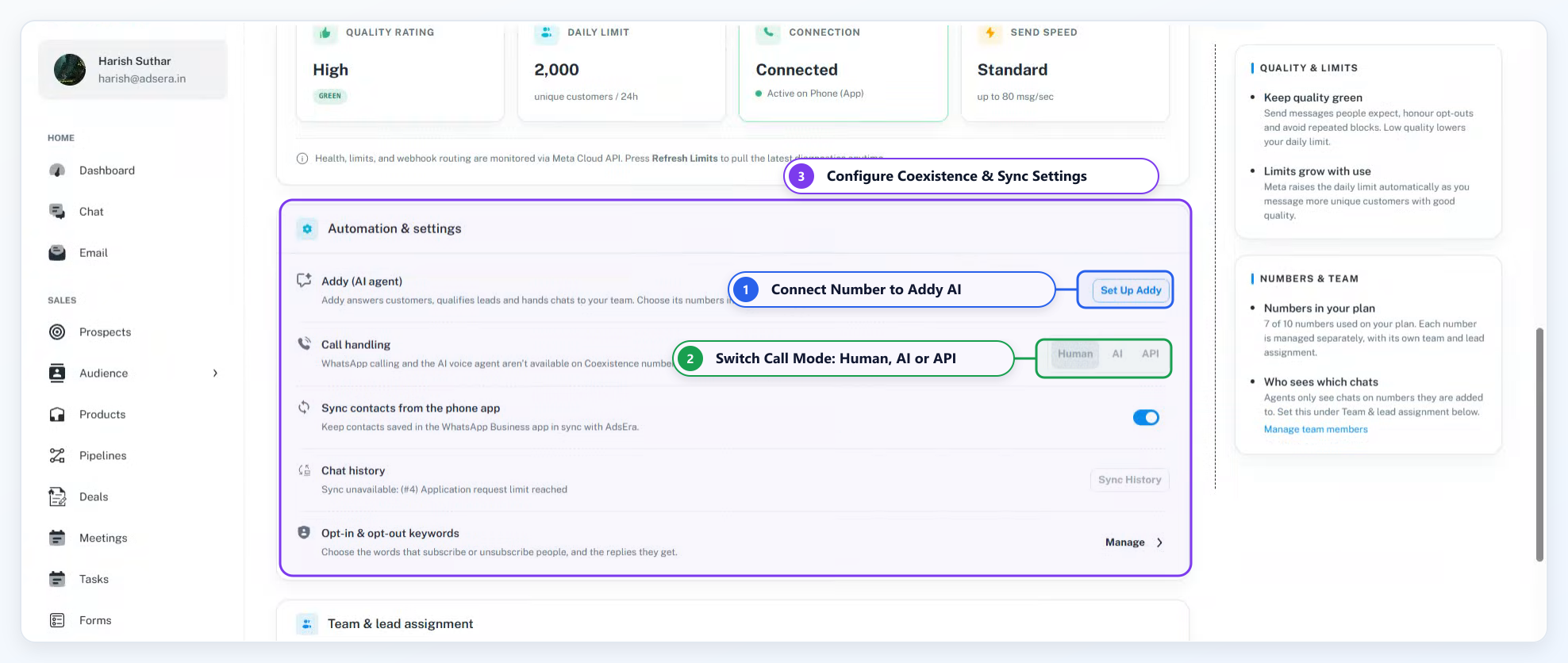
Important note: WhatsApp voice calling and Addy's AI voice agent apply to standard WhatsApp Cloud API numbers. Numbers connected via WhatsApp Coexistence continue ringing directly inside the WhatsApp Business mobile app.
Configuring Addy AI Voice Calls (Indian Voices, Recaps & Handoffs)
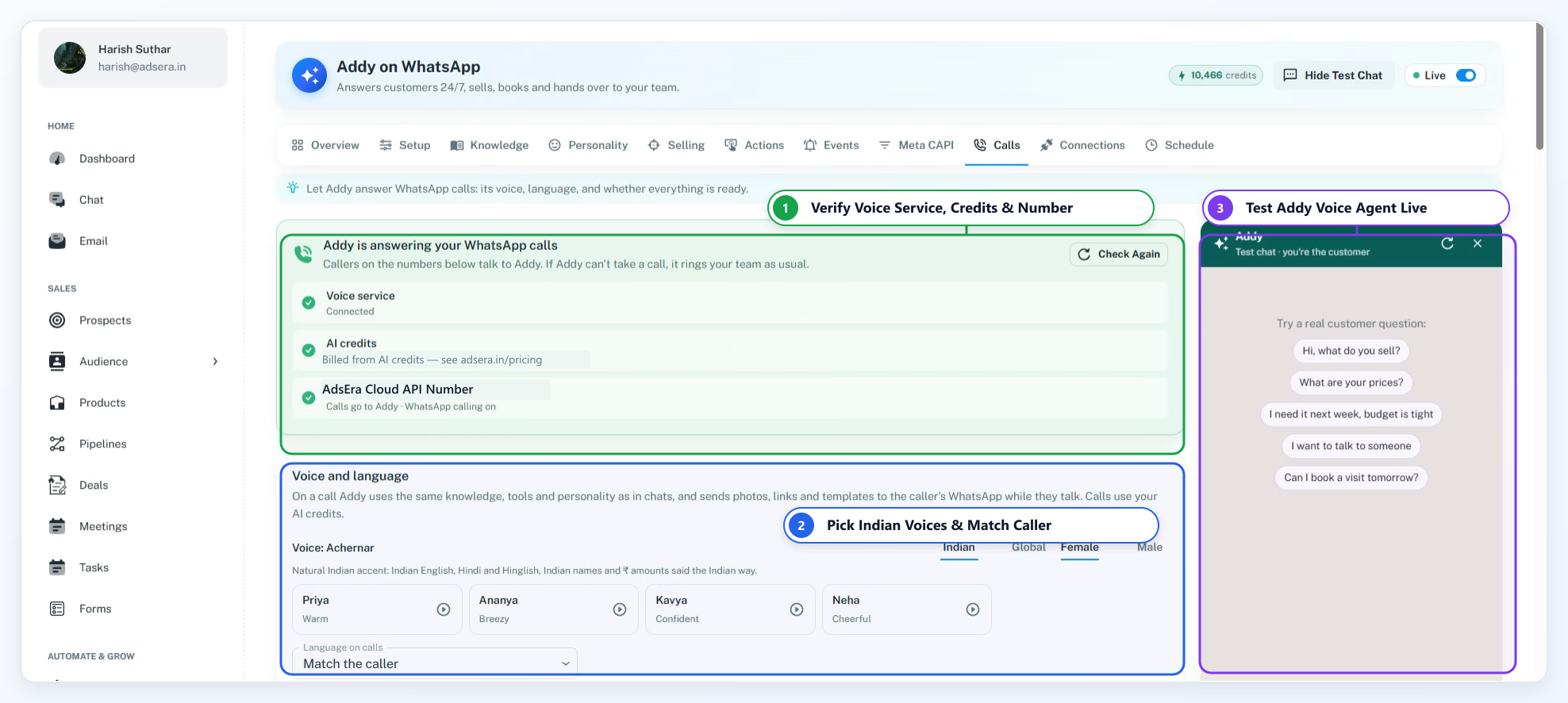
Open Addy → Calls (app.adsera.in/dashboard/ai-agent) to verify your Voice service readiness, AI credit balance, and active Cloud API numbers:
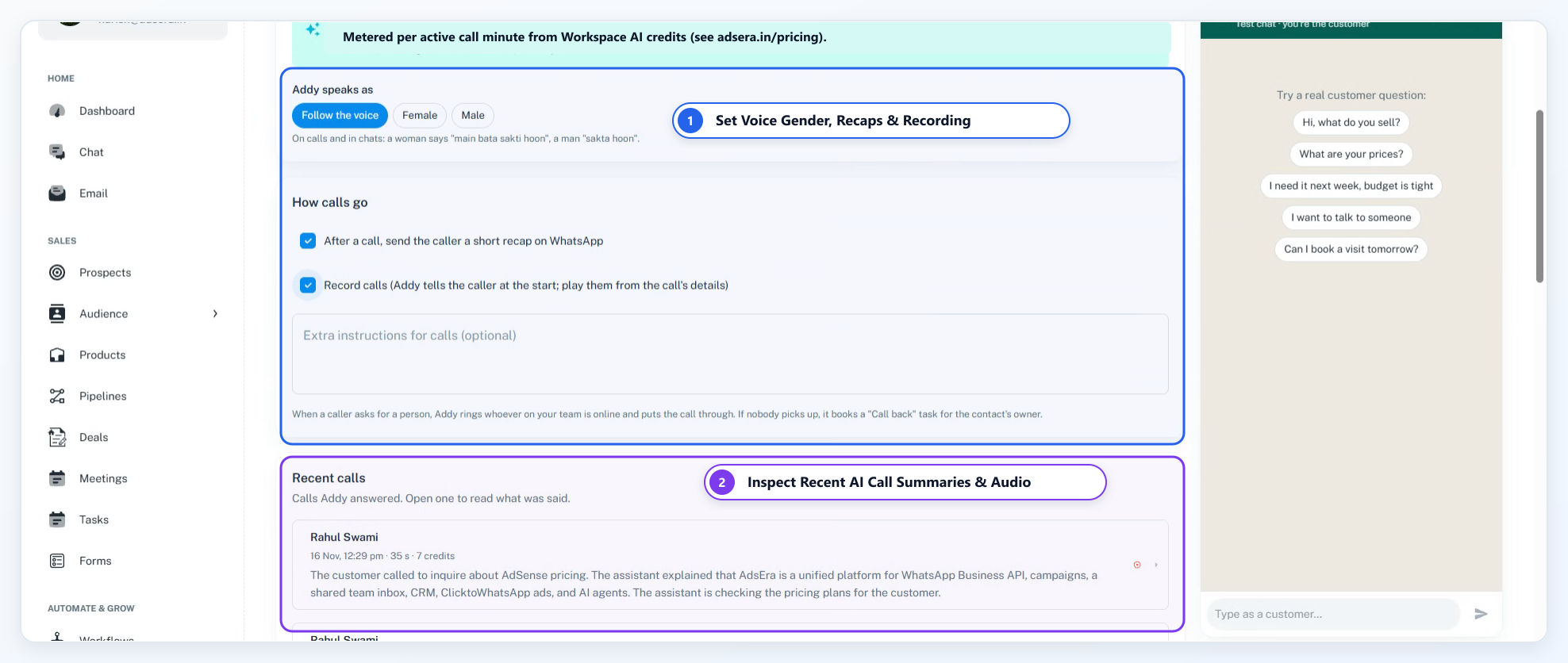
- Indian & Global Voices: Choose Indian or Global voices (such as Priya, Ananya, Kavya, or Neha), pick Language on calls → Match the caller so Addy responds in English, Hindi, or Hinglish automatically, and set Addy speaks as (Follow the voice, Female, or Male) so gendered phrasing matches naturally.
- Send WhatsApp Assets Mid-Call: While talking, Addy can send product images, booking links, or approved templates directly into the caller's WhatsApp chat.
- Live Team Handoff & Callback Fallback: When a caller asks for a human, Addy rings whichever teammate is online and displays a live call summary—stopping AI credit billing the moment your teammate accepts. If nobody picks up, Addy automatically creates a Call back task for the contact's owner.
- Call Recording, Extra Instructions & Post-Call Recaps: Turn on Record calls (Addy notifies callers upfront), toggle After a call, send the caller a short recap on WhatsApp, and review AI summaries under Recent calls.
Live Takeover & Outbound Calling From Inbox
- Take Over Active AI Calls: Open Inbox → Calling (app.adsera.in/dashboard/calls). Active calls show under Live now (labeled Talking to Addy), where reps can click Take over → Accept anytime to step into the call seamlessly.
- Filter Recordings & Transcripts: Switch between All calls and Missed tabs, filter by Direction or Answered by (Addy, A person, or Addy → Rep), and open any call drawer to play audio recordings or toggle between Summary and Original / translated transcripts.
- Outbound Calling with Call Permission: Because WhatsApp requires user consent before businesses place outbound calls, create a Call Permission template under WhatsApp → Templates → New template → Special formats (optional). Once the customer taps Allow, the Audio Call via WhatsApp phone button activates inside their chat header.
Read the full technical guides in WhatsApp Calling docs, Inbox → Calling, and Call permission templates.
Hear Addy Handle Live WhatsApp Voice Calls
Want to test Addy's Indian AI voice agent, browser inbox calls, and live rep handoffs for your clinic, admissions desk, or sales team? Book a 15-minute walkthrough.