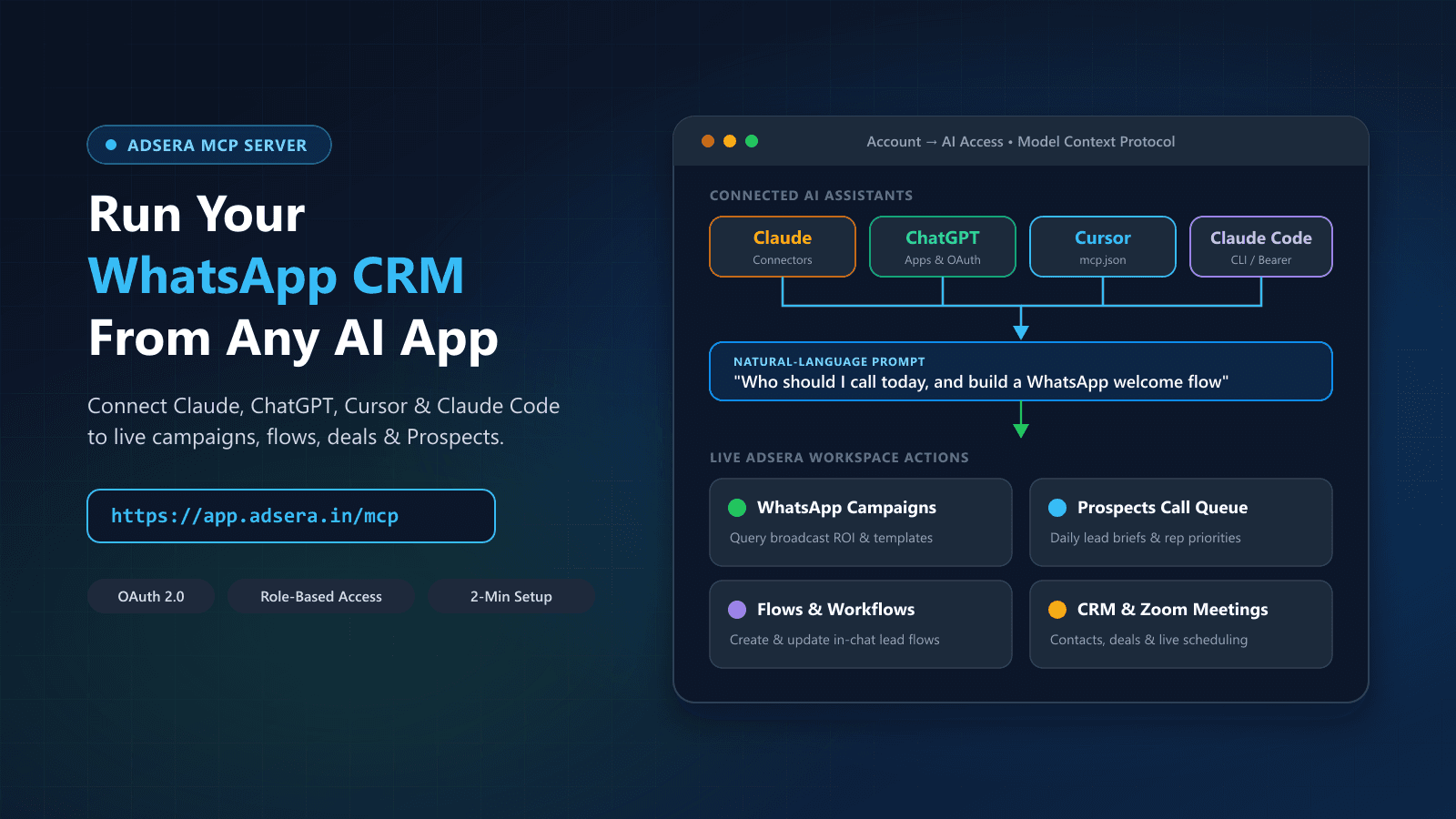
Most teams still jump across five browser tabs just to answer simple revenue questions: checking which WhatsApp broadcast performed best, looking up a lead in the CRM, scheduling a Zoom call, or finding out who sales reps should call next. With the AdsEra MCP server, you can connect Claude, ChatGPT, Cursor, and Claude Code directly to your live AdsEra workspace and get those tasks done with natural-language prompts.
Instead of exporting CSVs or switching dashboards, your AI assistant reads and acts inside your AdsEra account using your exact user role permissions—covering contacts, WhatsApp campaigns, WhatsApp Flows, Meta ads, CRM deals, Zoom meetings, and your daily Prospects queue.
What Is the AdsEra MCP Server?
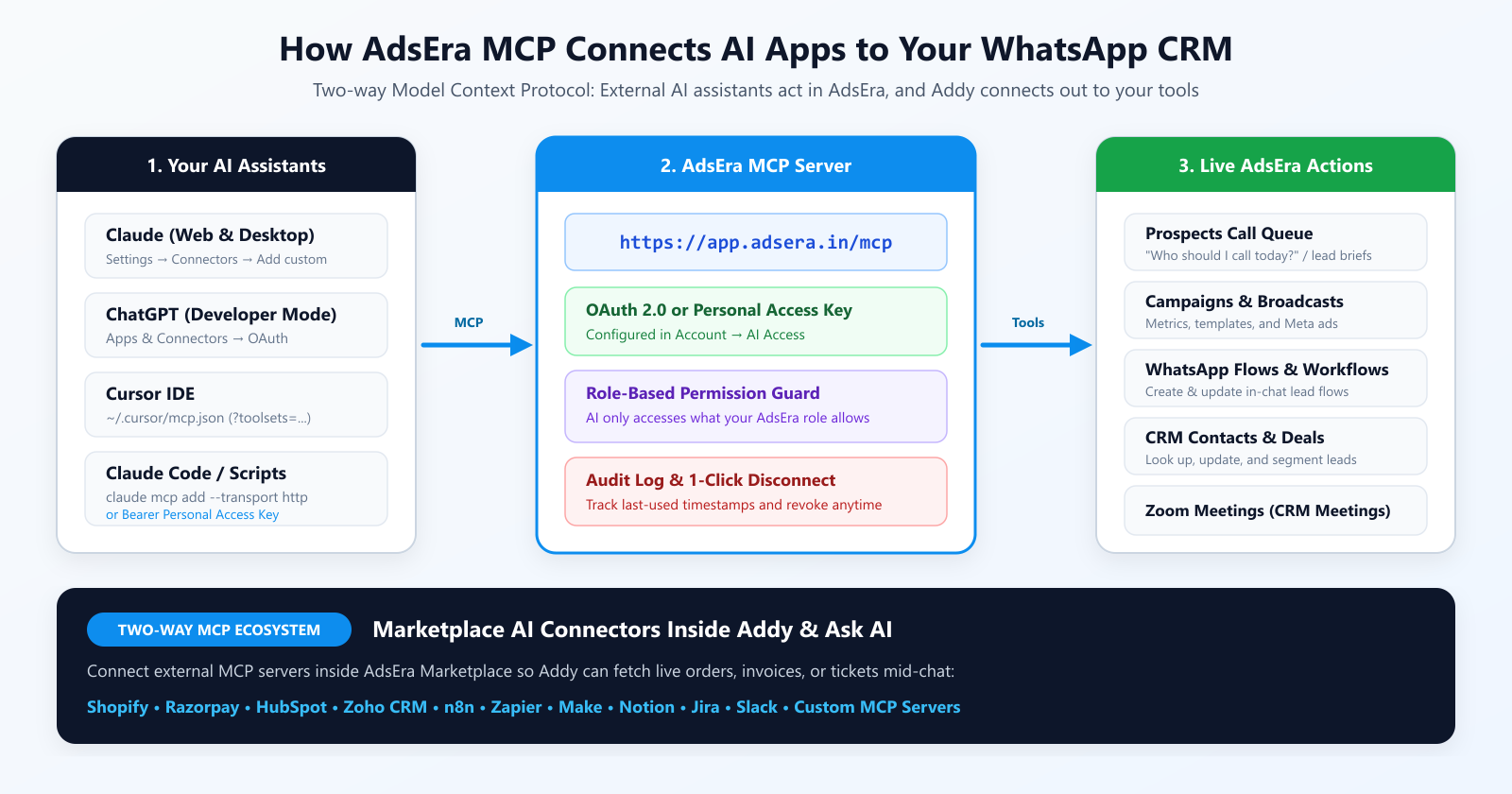
MCP (Model Context Protocol) is an open standard that lets AI clients safely call live tools inside external software. AdsEra exposes an official remote MCP server at:
https://app.adsera.in/mcpOnce connected under Account → AI Access in app.adsera.in/setting/ai-access, your AI app authenticates via OAuth (or a scoped Personal Access Key for CLI/headless scripts) and gains permission-aware access to your AdsEra data.
What You Can Ask & Automate via AdsEra MCP
- Daily Sales Triage (Prospects Queue): Ask "Who should I call today?", "Give me a brief on this lead", or "Show the team's day" straight from your Prospects mission queue (Prospects docs).
- Campaign & Broadcast Performance: Prompt "Which campaigns did best this month?" or "Show me my AdsEra account overview" without digging through reports.
- Workflow & Flow Creation: Tell Claude or ChatGPT to "Build a flow that welcomes new leads" and iterate quickly.
- CRM & Meeting Scheduling: Schedule, move, or check Zoom meetings—every Zoom meeting scheduled by an AI app is automatically saved to AdsEra's Meetings list.
Step-by-Step Setup: Connect AdsEra in Under 2 Minutes
Prerequisite: AdsEra's MCP server requires an active paid plan (see AdsEra Pricing—zero setup fees). Free or expired accounts receive an upgrade prompt when connecting.
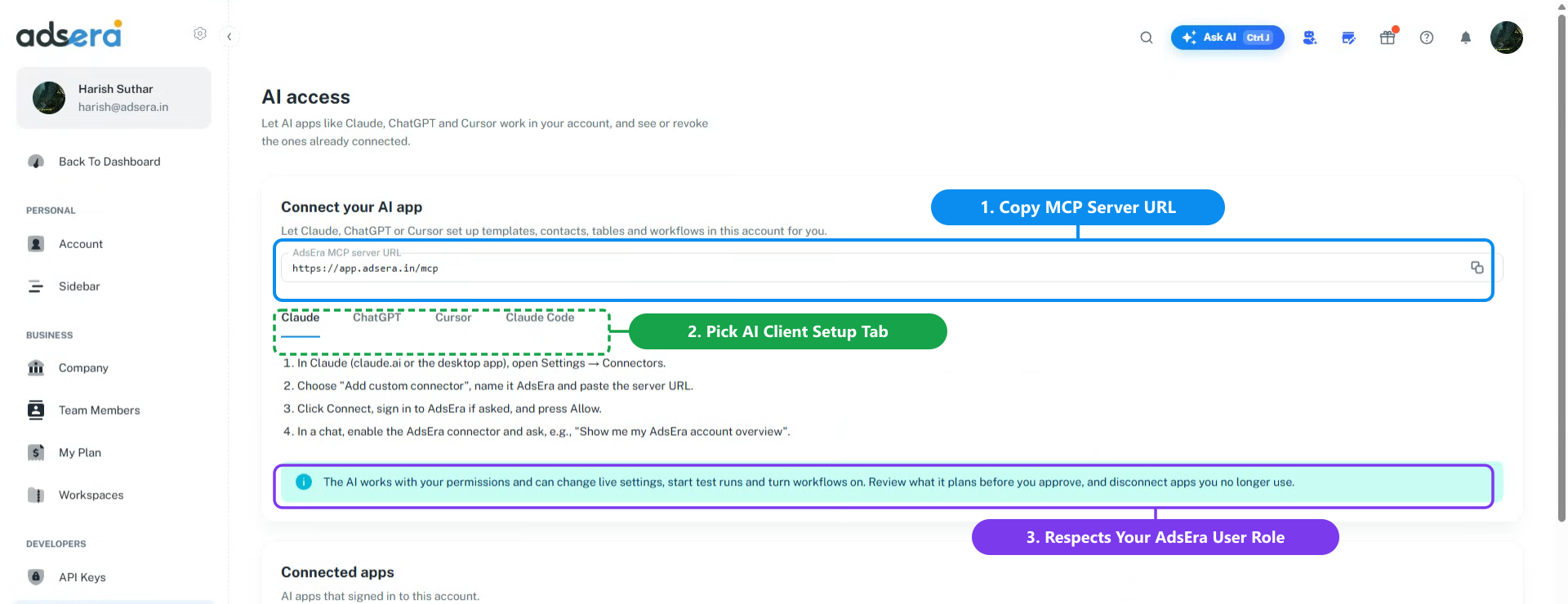
1. Connect to Claude (Web or Desktop)
- In Claude, open Settings → Connectors.
- Click Add custom connector, name it AdsEra, and paste
https://app.adsera.in/mcp. - Click Connect, sign in to AdsEra if prompted, and click Allow.
- Enable the AdsEra connector inside a chat and ask: "Show me my AdsEra account overview."
2. Connect to ChatGPT
- In ChatGPT, open Settings → Apps & Connectors and turn on developer mode under Advanced settings.
- Create a new connector named AdsEra, paste
https://app.adsera.in/mcp, and select OAuth authentication. - Sign in to AdsEra and click Allow, then select the connector in a new chat.
3. Connect to Cursor & Claude Code
In Cursor, add the following to ~/.cursor/mcp.json (or via Cursor Settings → MCP → Add new MCP server):
{
  "mcpServers": {
    "adsera": {
      "url": "https://app.adsera.in/mcp"
    }
  }
}
Pro Tip: Cursor performs best with focused toolsets. Append ?toolsets=flows,whatsapp (or contacts, campaigns, ads, crm, prospects) to the MCP URL.
For Claude Code, run in your terminal and then type /mcp to authenticate:
claude mcp add --transport http adsera https://app.adsera.in/mcpSecurity, Role Permissions & Personal Access Keys
| Control | How AdsEra Enforces It |
|---|---|
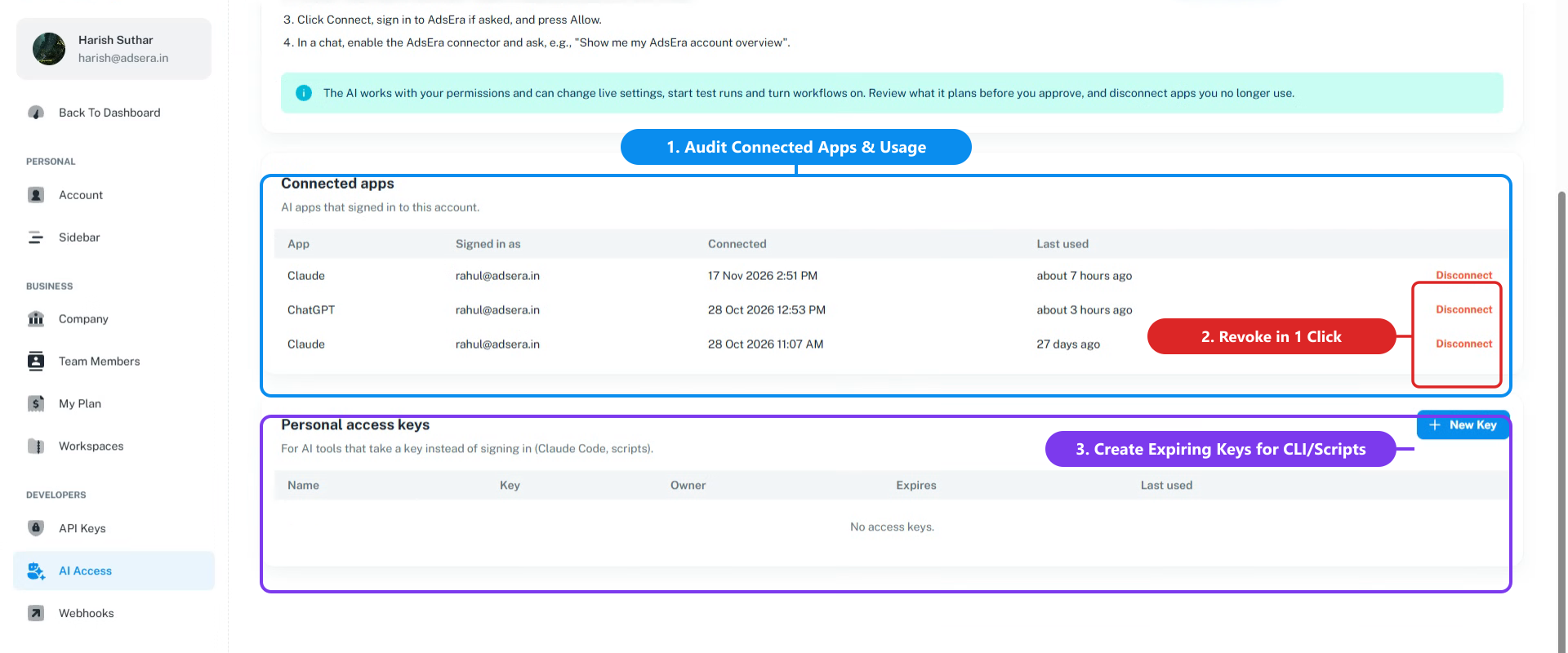
| User Role Enforcement | Any connected AI app can only perform actions your AdsEra user role allows. |
| Personal Access Keys | Create expiring Bearer keys under Account → AI Access → Personal access keys for headless scripts or CLI tools. |
| Audit & Revocation | Connected apps logs every app, who authorized it, and when it was last used—click Disconnect anytime. |
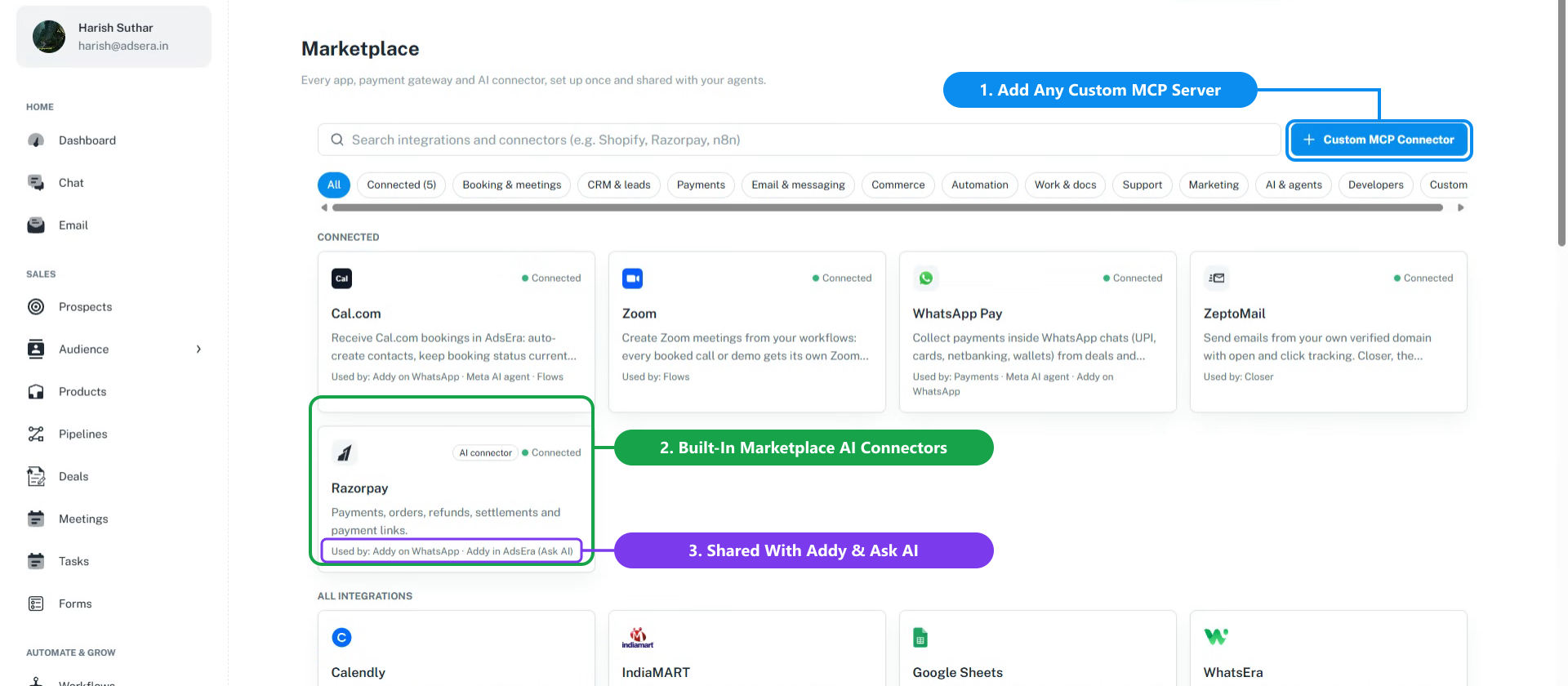
Want Two-Way MCP Connectors Inside Addy Too?
Not only can external AI apps control AdsEra—inside Marketplace, AdsEra also includes ready-made AI connectors (MCP) for Shopify, HubSpot, Razorpay, n8n, Zapier, Make, Zoho CRM, Notion, Jira, Slack, and custom MCP servers so Addy and Ask AI can check live order or CRM data while chatting with customers on WhatsApp. Read the AdsEra MCP documentation for full setup details.
Ready to Run Your WhatsApp CRM Through AI?
See AdsEra MCP, Addy, and automated WhatsApp follow-ups live in a 15-minute walkthrough with our team.